Fix my problem in start client

|
|






Fix my problem in start client

 05-27-2018, 03:19 PM
but after clicking Start, button dissapears and nothing happens...


.png "Zakyamuni's Avatar")

How did you do it?Originally Posted by abdo4ever99

I'm about to format the whole pc due to this, lol.



Hi,
Try to deactivate UAC DEP on Windows, the restart your PC and try again.
Disable DEP https://www.online-tech-tips.com/win...f-dep-windows/
Disable UAC: https://articulate.com/support/artic...-in-windows-10
Cheers,
Zakyamuni (05-28-2018)
I introduce the game to a friend and he felt in love.
We downloaded the game at his computer and had 740 problem that was not able to fix with the 740 fixing tips from the other pinned post.
But, we were able to fix it disabling that DEP thing. And now works for him.
Not that lucky with my girlfriend's computer. That still won't work with DEP tips.
What happened here is that Windows 10 does not allow to fully disable DEP system
It shows an error at the Command System that says:
C:\WINDOWS\system32>bcdedit.exe /set {current} nx AlwaysOff
Error al establecer los datos del elemento.
El valor está protegido por la directiva de arranque seguro y no se puede modificar ni eliminar.
That shoud means:
Failed to set the item's data.
The value is protected by the safe boot policy and can not be modified or deleted.
What this means?
Could be a problem with Windows 10 Home edition??
Hello,
Try this:
STEP 1. Go to ''YOUR PC'', right click, choose PROPERTIES. (See below)
Step 2. Go to ''Advanced System Settings'' (See below)
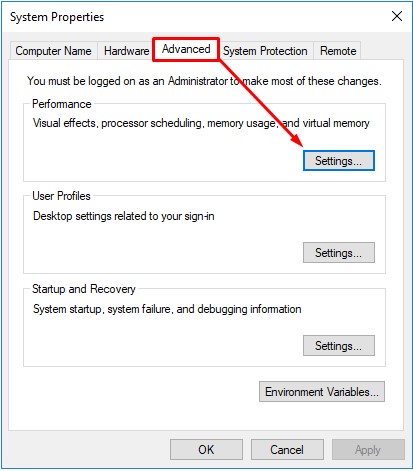
Step 3. Go to ''Advanced'' and then ''Settings'' (See below)
Step 4. Go to ''Data Execution Prevention'' and select ''Turn on DEP for all programs and services except those I select''
Step 5. Click ''Add'' and find your Origin Online Folder.
Step 6. Add these 3 files (Launcher.exe, OriginClient.exe and OriginPatcher.exe) into that box one by one and press OK. (See below)
gGNjgab.jpg
When you are done, Click on apply and OK, then restart your computer and try to run the client again.
Cheers,
Hello again,
I've updated Windows 10 Home to Windows 10 Pro.
Now, problem changed (but I'm seeing a light at the end of this awful tunnel xD)
Launcher never starts.
I think this could be caused by AntiVirus (Avast Free). As, on my friends computer, we were suffering this same problem that deactivating Avast fixed.
This solution wont fix my gf's problem.
But I'm uninstalling Avast for good. I don't think Windows 10 Pro needs an AntiVirus running. Maybe because DEP system?
DEP is disable for all three SRO files.
I will back with news.
(I'm also installing a new driver for graphic card)
Extra info: My friend's and my gf's computer were HP brand. Does the people who has this same problems use HP as well?
This is freaking wierd...
Now, after uninstall Avast.
Game wont even open the launcher. It opens but close instantly without poping up the window.
If I enable DEP it opens!!
No sense.
But when Opens, after clicking Start, back to old problem: Nothing happens.
This drives me nuts,
seriously...
| « Previous Thread | Next Thread » |